
Vendors and payables
Who you buy from, what they will extend you, and how much of that is already spoken for. Two tabs under Shop, both gated on purchasing.
Two tabs under Shop carry the supply side of the business. Vendors is the address book you raise quote requests and purchase orders against. Accounts payable is the money view of the same list: what each vendor will extend you, how much of it is committed, and what you have paid. Both appear only if your shop has the purchasing module.
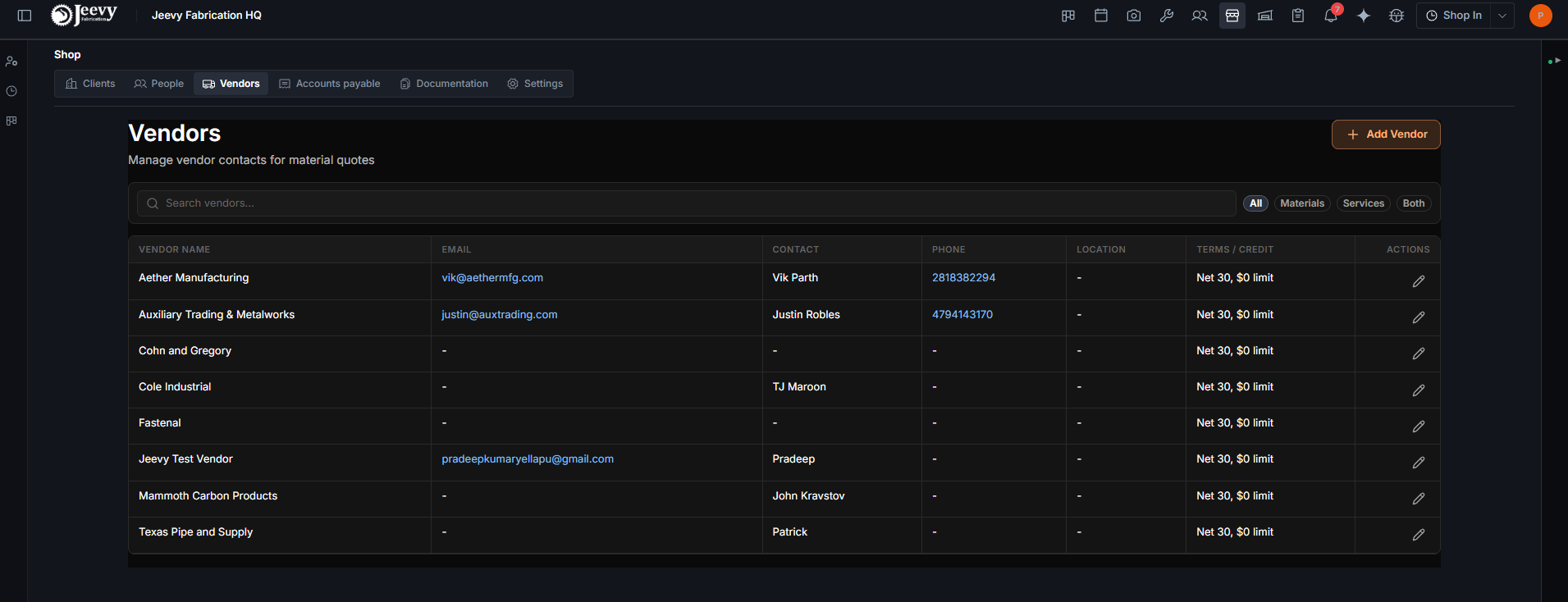
Vendors is the list you buy from
A vendor is a name, an email, a contact person, a phone number and an address, and the address book is the point: a purchase order or a quote request needs a place to go, and this is where it comes from.
Two things on this tab do real work beyond contact details.
What they supply. Every vendor is marked as providing materials, services, or both, and the filter chips at the top of the list are All, Materials, Services and Both. That is what stops a machining shop appearing in a list of steel suppliers.
Terms and credit. One column, showing whichever is true of that vendor:
| What you see | What it means |
|---|---|
Net 30, Due on Receipt | Their payment terms in days |
$50,000 limit | The credit line you have with them |
PO / Card / Cash | They take these methods, and credit is not one of them |
Accounts payable is the same list, in money
Click through to Accounts payable and every vendor gets a row of numbers, with the shop totals across the top.
| Column | What it counts |
|---|---|
| Credit Limit | What this vendor will extend you |
| PO Open | Invoiced lines not yet paid |
| Payments | What you have paid them |
| Remaining | Limit minus what is committed |
| Util % | How much of the line is used |
Click a vendor row to see their payments broken down by project, and to record a new one.
Credit is enforced, if you ask for it
A shop owner can turn on Enforce vendor credit line when purchasing in Shop Overview, under Settings. See Shop settings. With it on, a purchase on vendor credit is blocked when it would exceed what is left, and blocked when the vendor has no credit line recorded at all.
The other guard on spending
Credit enforcement caps what one vendor can carry. Purchasing sign-off, on the same settings screen, caps what one purchase can be worth: any line above the threshold routes to Needs Approval instead of going straight to On Order or Purchased. They solve different problems and it is normal to run both.