
Quotes and projects
Everything the shop is working on. A quote is a job you are pricing; accepting it turns it into a project and carries everything across.
Two tabs, one list of work. A quote is a job you are pricing. A project is a job you are building. They are the same job at two points in its life, which is why converting one carries everything with it.
Creating one from the dashboard needs a name and a client. Description stays on the short form so you can write it now, but it is not required. A new project can take a client PO number and file next to the client field; both are optional. Add detailed fields puts the point of contact beside the client. The dropdown lists that client's saved contacts. Add new contact opens a dialog for the name, email, and phone, and saves the person onto the client.

A quote becomes the project
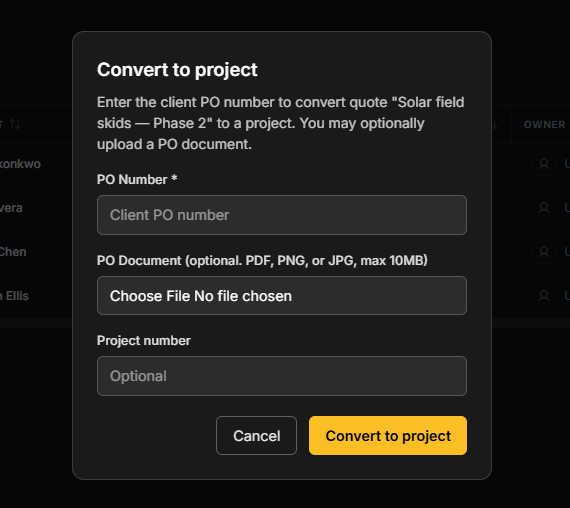
Converting a quote creates the project and carries its files, work streams and tasks onto it. Nothing is retyped, and nothing has to be uploaded twice.
Convert appears at Bid Accepted
The button shows once the quote reaches the Bid Accepted stage. If you cannot see it, the stage is what to change first.
Converting can take a client PO number and document. Both are optional, the same as when you create a project.
Working the list
One click opens the job. Double-click a cell to edit it in place.
The list shows number, name, PO, client, contact, location, owner, stage and deadline. View adds Class. When Clock Management is on, View can also add Labor or the Floor Rhythm panel. Those stay hidden if clock-in is off: they read the same shop hours as Shop Time.
Project Logs without opening the job
The Project Logs action on a row opens the same log the job's detail page shows. It is not a separate comment stream.
Type @ to mention a teammate, and images can go with it.
Pins are yours alone
Pinning a row lifts it to the top of your list and nobody else's. Pinned rows stay above whatever sort you apply.