
Reading the Gantt
What every bar shape means, how groups get their dates, and the line between planning and deployed.
One set of bar shapes across the project Gantt and the shop Schedule page. The Gantt shows how one job is structured. The shop Schedule page shows every deployed task and expected material delivery, grouped by project and work stream. Filled and faded mean the same thing on each. Colours are read per screen.
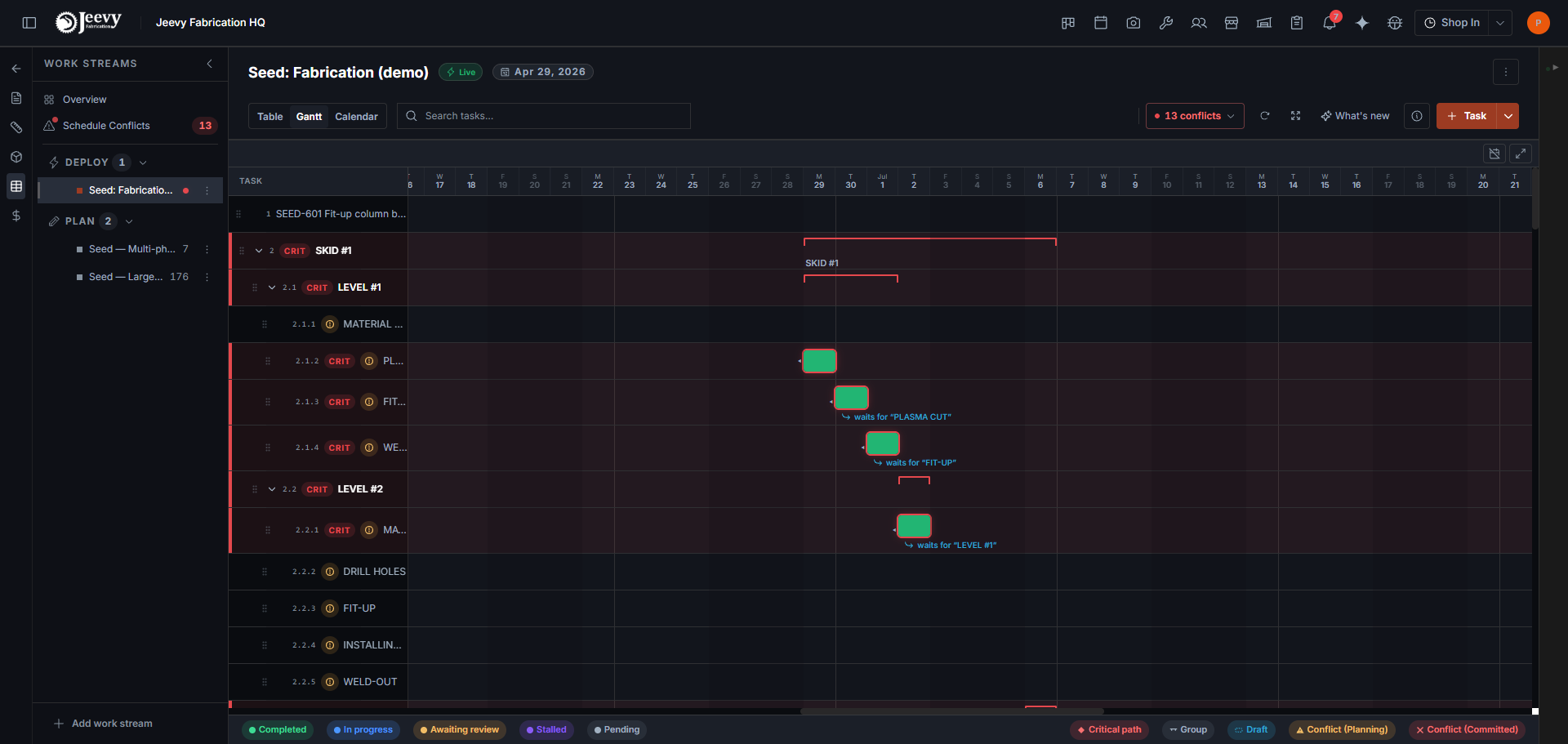
What each bar means
| On screen | Where | What it means |
|---|---|---|
| Filled bar | Both | Deployed. The stream is live and the engine treats it as fact. Colour is task status on both screens: pending slate, in-progress azure, completed green, stalled purple, awaiting-review amber. Overdue paints the bar error-red. |
| Faded bar | Gantt | Planning. Not deployed yet, still free to move. |
| Package bar | Schedule Work | Material delivery. Expected arrival on that day. Click it to open Receiving. |
| Thin amber bar | Gantt | Group rollup. The span of the tasks inside. You cannot drag or type it. |
| Blue hatched | Gantt | Sketch. An empty group's rough envelope. Real task dates take over as work is added. |
| Red edge or chip | Both | Conflict. Something the numbers say cannot work. See Conflicts. |
| Off-day stretch | Both | The bar crosses days the shop does not work. Nothing happens there; no hours are lost. |
Groups
A group is a name for a collection of work: a phase, a spool, an area. Nobody welds a group, so a group never has a schedule of its own.
- Its dates come from its tasks, earliest start to latest finish. Like a folder's size: you do not set it, it adds up.
- Its dependencies flow down to every task inside. Add "waits for Weld" to the group and every task waits, including tasks you add later.
- Its planned start is a measuring stick, not a wall. Any task starting before it gets a warning; nothing is held back or moved.
- Its target grades the result. A target finish raises a flag if the work runs past. It never squeezes the work to fit.
An empty group is the exception that proves the rule: with no work to report, your typed dates draw a sketch of the phase. As tasks arrive, real dates take over and your sketch dates stay on as the group's measuring sticks.
The planned start seeds the group's tasks. A new task shows the group's planned start as its default, a starting point you can change rather than a link. Setting a group's planned start also pulls in any task inside that already has a duration but no start of its own, so their bars land together.
Planning versus deployed
Deploying a work stream is the line that matters.
Before it: faded bars, private to planning, rearrange freely. After it: solid bars, a promise workers can see, and the engine treats those hours as claimed when checking everyone else's schedule.
Conflicts on deployed work outrank everything else, because they are promises that cannot both be kept.
Deploy when you mean it. Sketch and rearrange first; deploy once.
The shop schedule
The Schedule page is the shop-wide board, not a per-job chart.
- Work lists every deployed task and every expected delivery, grouped by project and then by work stream. Collapse a project or a work stream to hide its rows. The caret collapses a stream; clicking the stream name or a task opens details on the right, the same drawer the tasking tab uses. Open work stream on that pane goes to the stream itself. Click a delivery to open it in Receiving. Filter chips switch the board between tasks and deliveries. Search by task, person, job, vendor, or PO to hide the rows that do not match.
- Each day on the calendar shows how many people the deployed tasks need that day. Hover the day for the capabilities those tasks ask for. Click the day for a table of who is assigned, which task they are on, and the capability type. A shop-off day counts nobody; tasks that span it pause there.
Only deployed streams appear as solid work. Dated deliveries land on their expected (or needed-by) day. An open PO with no date still appears, marked Date TBD, so missing dates stay visible. Same rows Receiving tracks.
Common questions
Why can't I type dates on a group?
Because a group's dates are a measurement of the work inside it. Typing them would make the chart show a wish instead of a fact. What you can set is a planned start and a target finish: measuring sticks that warn when work drifts, without ever moving a task.
Why is part of a bar faded?
The bar crosses days the shop does not work. The fade means nothing happens there: work pauses and resumes, no hours lost.