
Shop settings
Your address and time zone, the working week and holidays, your logo, and the shop-wide defaults everything else is measured against.
The quietest screen in the app and the one with the longest reach. Signing up asked for your shop name and nothing else, so this is where the rest of the shop gets described: where it is, what it can do, what days it works, what it puts on a purchase order, and where the limits are on spending. Every date on every Gantt in the shop is computed against what is set here.
Find it at Shop Overview, then the Settings tab. It is also step 1 of the dashboard setup checklist.
The settings are grouped, and the list on the left is how you move between them: Shop Basics, Scheduling, Shop Rate, Inventory and Purchasing, Quoting, Notifications, and Partner network. Shop Basics is what opens first. One Save covers the whole screen, so you can change the calendar and the terms together and save once.
Branding
Your logo, printed on the documents Jeevy generates: quotes, purchase orders, quote requests and work orders. Without one, those documents carry your shop name and nothing else.
PNG or JPG, up to 5MB. SVG is not accepted, because the logo is rendered into PDFs on the server.
Shop location and time zone
Location is a Google-backed address box. Start typing and pick the place from the list; picking one resolves the printable address and the time zone in the same step. If Google is unreachable or the place is not in its list, there is no dropdown and whatever you typed is saved as written, so the field never refuses an address.
Time zone is an editable select sitting under it, not a read-only line. Picking an address fills it in. Picking here overrides that.
Press Save location. The address and the time zone save together.
Listed capabilities
Capabilities, What you build, Certifications, and Equipment. This is the list platform admins search when they need a shop that can do a kind of work.
Until you save, the lists are filled in from your network application, when one is linked to someone at this shop. Press Save capabilities and the shop's answers replace those. The application itself is left as it was submitted. A shop with no application can still publish a list from here.
Add documentation attaches one PDF or image to a single capability, or to a single certification. Each of those can have one file, and adding another for the same one replaces it. On the shop profile, a capability or certification with a file is green, and the link opens that file.
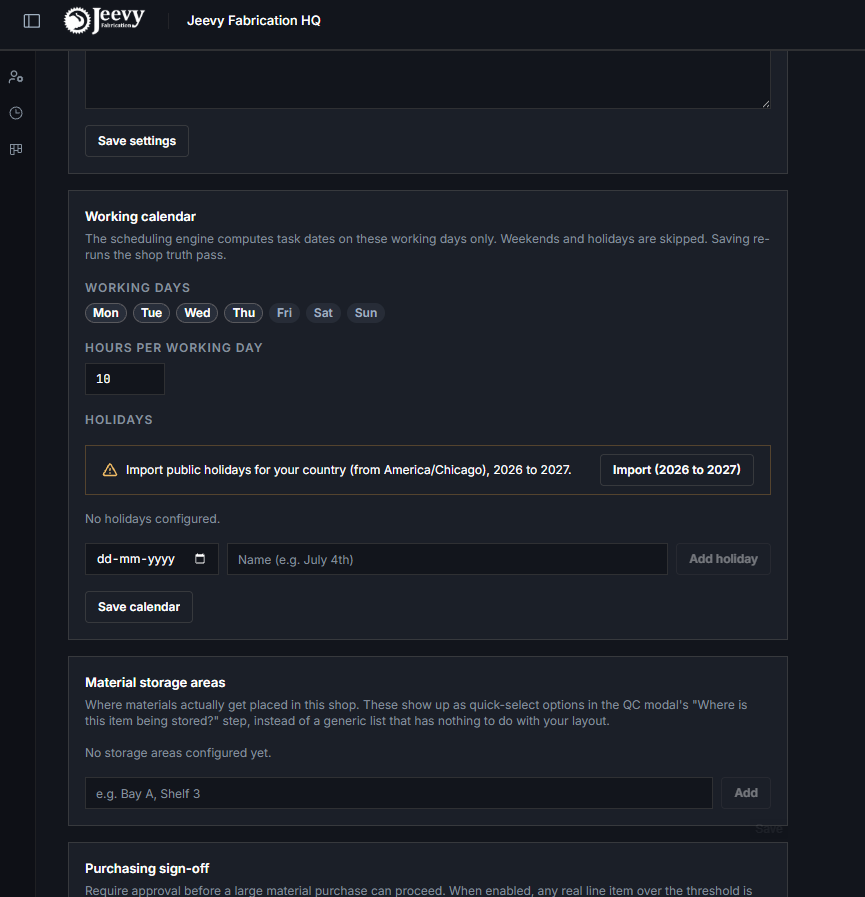
Working calendar
Working days and hours per day are what every task duration is laid across. A three-day task in a Monday-to-Thursday shop does not finish in three calendar days, and the schedule knows that because of this screen.
- Working days are the seven day chips. Tap to turn a day on or off.
- Hours per working day is a single number for the shop, in half-hour steps.
- Holidays are a dated list, grouped by year. Import pulls the public holidays for your country, derived from the shop time zone, for this year and next. You can add one by hand, and remove a year's imported set in one action.
Hours per day, not hours per person
The shop day is what a double booking is measured against. Twelve hours of work assigned to one person against a ten-hour day is a conflict; the same twelve hours in a twelve-hour shop is not.
Changing this changes what counts as over-committed across every open job. See Conflicts.
The other groups
Quoting holds the standard terms copied into each new quote bid, and the default target margin every project starts from. Editing the terms here does not touch bids that already exist. A project can override the margin from its own Financials tab.
Shop Rate holds an hourly rate per trade, and a base rate for hours that are not on a task with a capability. That table is covered in the next section.
Inventory and Purchasing holds where material is stored, the approval threshold for a large purchase, the vendor credit line check, and, when the shop has the integrations module, the standing instructions for the daily email audit.
Notifications holds the summary and mention emails the shop sends. The three summaries start off, so a new shop is quiet on its first day rather than mailing everyone a recap of a day it has not had yet. Turn on the ones your shop actually reads. Mention email starts on, because a mention is addressed to a particular person and they are expected to see it.
| Card | Group | What it sets | Who can change it |
|---|---|---|---|
| Quote defaults | Quoting | Standard terms and conditions copied into each new quote bid. | Anyone with shop management write access |
| Default margin | Quoting | The margin every new project starts with. | Anyone with write access to work streams |
| Material storage areas | Inventory and Purchasing | The places materials actually get put in your shop. They become the quick-select options in the QC modal's "Where is this item being stored?" step. | Anyone with shop management write access |
| Email audit instructions | Inventory and Purchasing | Plain-language standing instructions for the daily inbox agent, used alongside its own PO and RFQ detection. See The inbox agent. | Owner or Manager |
| Purchasing sign-off | Inventory and Purchasing | Require approval above a dollar threshold. Any real line over it routes to Needs Approval instead of going straight to On Order or Purchased. | Owner or Manager |
| Vendor credit line | Inventory and Purchasing | Block purchases on vendor credit that exceed the vendor's remaining credit, or where no credit line is set. See Vendors and accounts payable. | Owner only |
| Email notifications | Notifications | Which summary and mention emails this shop sends at all. Summaries start off, mention email starts on. Turning one on also lets you set what new members start with. Controls email only: in-app and text alerts are separate. See Your account. | Owner only |
Shop rates, and how an hour gets priced
Shop Rate holds an hourly rate per capability, with an optional rate per skill tier, and a base rate above that table. The base rate starts at $70 an hour. It is what Financials uses for hours that are not on a task with a capability.
Logged and remaining hours on a job are costed from these shop rates only. A person's own pay is not part of the figure.
| Rate | Used when | |
|---|---|---|
| 1 | The task's capability rate | The hours are on a task that has a capability. Uses the worker's tier on that capability when there is one, otherwise the capability's own rate |
| 2 | The shop base rate | The hours are not on a task with a capability, or that capability has no rate of its own. $70 an hour until you change it |
Rates are per shop and are never shared with another shop on the same install. Seeing or setting them needs personnel access, the same permission as pay rates.
Partner network, and the agreement you sign once
Partner network holds one thing: the Jeevy network agreement. Signing it is what lets other shops on the network send work to your shop.
Read the whole text on this card. Signing asks for your full legal name, your job title, and a tick confirming you accept it for the shop. Only a shop owner or manager can sign; anyone with access to settings can read it. Once it is signed the card shows who signed, as what, and when, with a link to the signed copy as a PDF.
It never expires, and it is signed once for the shop rather than once per person. Somebody leaving does not un-sign it.
Until it is signed, a request from another shop arrives as an empty envelope. You can see that it exists and who sent it, and nothing else: no scope, no drawings, no material list, and no way to submit a price or pass on the job. That applies to a job already in progress as much as to a new one, so if the agreement is replaced by a new version, work in flight waits for a signature too.
When a change takes effect
Saving the working calendar re-runs the shop truth pass: the schedule recomputes automatically after a change to working days, hours or holidays. You do not have to go and re-run anything.